How to Cancel or Surrender PAN & Aadhaar Card of a deceased person?

PAN Card Number and Aadhaar Card Number are two numbers that each person residing in India is encouraged to register for and get. There are roughly around 29 crore PAN card holders and more than 111 crore people now have an Aadhaar number, covering more than 98 to 99% of the Indian adult population.
We all know that the usage of PAN card is no longer limited to just your income tax return filing, it is now linked to your Bank account and hence almost every financial transaction routed through your bank can be traced.
Also, PAN is a very important document that needs to be quoted / submitted while dealing with real-estate property transactions (physical assets), financial investments like Mutual Funds or Stocks, investments in Gold (beyond specified threshold limit), sale or purchase of motor vehicle(especially four wheeler), while executing banking transactions etc.,
Whether we like it or not, Aadhaar card has become the biggest and most important personal identification document, if it hasn’t already. Aadhaar Card is one of the most important documents these days, which is being used in almost every aspect of our lives – be it opening a bank account, applying for an LPG subsidy or simply getting a new mobile number.
Given the importance of these two unique numbers, we need to be very careful in using these numbers. With identity theft being rampant, if PAN and Aadhaar are not surrendered when someone is no more, it could lead to mis-use of the numbers.
When & how to surrender PAN card?
- You have more than one pan card (0r)
- The pan card holder is no more.
For the first reason, if you are holding more than one pan card then the procedure to surrender the ‘duplicate PAN card‘ is very easy. You can get this done through NSDL or through UTI. You can surrender duplicate PAN cards through online mode as well.
On the demise of the PAN card holder, a legal representative of the deceased person can surrender the PAN card through offline mode (only). Below is the procedure ;
- Kindly note that if the deceased person is a Tax payer, make sure you (legal representative)file his/her income tax return before cancelling / surrendering the deceased person’s PAN card. The legal representative of the deceased person is liable to pay the tax dues (if any).
- The legal heir of the deceased individual has to submit a letter addressed to the Income Tax Assessing officer of the concerned Jurisdiction.
- You need to provide details like – deceased person’s PAN number, Full name (as in PAN), Date of Birth and father’s name.
- In the letter, you need to mention the reason as ‘surrender of PAN card due to death….’ You also need to enclose a copy of deceased’s death certificate and original PAN card.
- You need to visit any ‘Aaykar sampark kendra‘ (ASK) or at the jurisdictional AO office and submit the ‘PAN card surrender request’ in person. Kindly get the acknowledgement for the same on the photocopy of the letter.
- After, you have surrendered the PAN of the deceased assessee, the Income Tax Dept would make a check against the surrendered PAN to verify if any dues , Refunds or any ‘case’ against the PAN is pending. If there is any demand of tax against the surrendered PAN, that must be discharged by the Legal Heir who is ‘surrendering the PAN’.
- In case, there are NO demands, no dues, no refunds and no cases pending against the PAN, then the ITD would ‘deactivate’ or ‘delete’ the PAN forever. (If ITD deactivates the PAN , then the status of the PAN would not remain ACTIVE, but the PAN would continue to exist in the records of the department.)
- If you do not know the relevant ‘jurisdiction’ details, you can get them at the e-Filing portal ;
- Kindly visit e-Filing portal and click on ‘know your AO’ link on the home-page.
- The legal heir of the deceased individual has to submit a letter addressed to the Income Tax Assessing officer of the concerned Jurisdiction.
 You need to enter the deceased’s PAN number and any mobile number to receive OTP and click on ‘submit’ button.
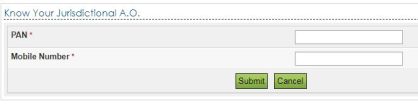
You then have to enter the OTP in the relevant field.

SBI Fixed Deposit Rates for 1 year revised to 4.9%. Time to Lock the Interest Rate.

3 Golden Rules to Retire Rich and Young

RBI cancels CKP Co-operative Bank’s licence; depositors to get up to Rs 5 lakh ONLY
About Author

Parinita Sharma
Parinita Sharma is a Certified Financial Planner (CFP) & FS, CS, MDI, PG. She is a member of team Advey. Team Advey is associated member of LIC of India with 100 Professional partners. From last 30 year we are assisting 50,000 families to fulfil their Financial Dream in guaranteed way. At present we are managing the Risk cover of more than Rs.6000 Crore. We are providing need base Solution through financial planning. To Know more about our provided services click on given link... http://mydc.in/?a=7003729563-7 Email: parinitasharma59@gmail.com